

Error Handling & Rate Limiting
## Rate Limits and Blocks There are two different types of limits/blocks you may encounter: rate-based and account-based. Be sure to familiarize yourself with both types of limits, as they are vastly different. Our rate limiting rules are primarily intended to prevent runaway scripts, infinite loops, or crushing amounts of concurrency. Working, good-hygiene code should not experience any blocks. The single most important guidelines are to write code that will properly handle 429 responses by slowing or pausing requests without crashing, and to not parallelize into simultaneous requests that will compete for resources and flood our systems. Advanced Billing uses a custom algorithmic slot-based limiting that isn't based on typical rate limits per second. Rather, we handle call limiting based on concurrency, and a maximum of 4 concurrent API calls can be made. This does not mean that only 4 requests are allowed per second; rather, 4 server threads or workers can be running concurrently per subdomain at a time. Any concurrency that goes above 4 is at risk for being queued for processing after the concurrency once again drops to acceptable ranges. As such, we recommend when building out your API processes to focus on the number of concurrent calls rather than the actual rate of calls per hour. To help illustrate this, we've provided a diagram below. Presume that each API call takes a full minute. While this will likely not be the case for your own processes, it does illustrate the limitations for calls. | 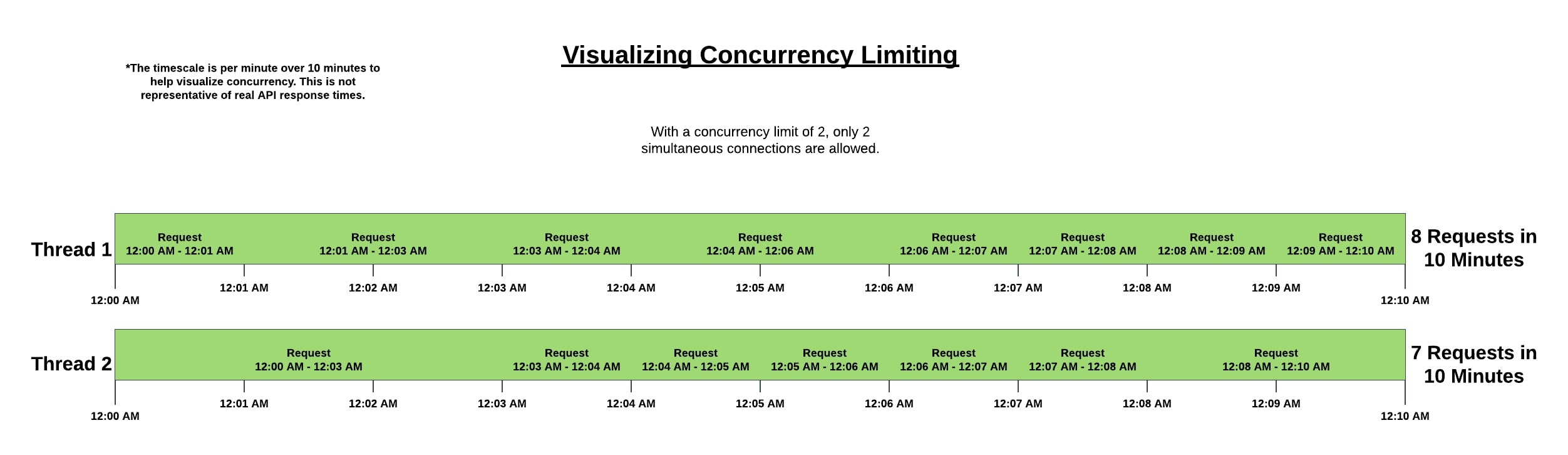 | | --------------------------------------------------------------------------------------- | | **Diagram of concurrency-based rate limiting presuming a limit of 2 threads at a time** | ### Rate-based Blocks When performing a large synchronization or retrieving a large amount of data, you may trigger a security failsafe used to prevent abuse and protect our site from attacks. We don’t want to block small bursts in usage; so instead of immediately rejecting your requests, Advanced Billing will slow and throttle requests. > ❗️ If you see your responses coming in slower, do not parallelize your requests or try to make more concurrent requests to speed things up. You’ll only have to wait longer for your requests to get through. If you have too many slowed requests, or your individual account queue gets too full with too many concurrent requests, you’ll likely receive an HTTP `429 Too Many Requests` response code with a message and a reference code: `Your request was denied due to a usage violation. You can track this request with support by referencing …` If you receive a `429 Too Many Requests` response, your code should be prepared to handle it by pausing its queries, waiting a few minutes, and then proceeding slower (or with less concurrency). Feel free to [open a support ticket](https://maxio.zendesk.com/hc/en-us/requests/new) so we can investigate what happened and why the request was blocked. ### Account-based Blocks There are a few scenarios that could cause a request to be blocked even with correct credentials. You can read about them [here](#api-access-limitations). If you have a request blocked with a `422` status code and an error message, it may be due to this account-based blocking. ### Prioritization of Endpoints We consider certain endpoints as "critical", such as new customer signups and component allocations. We first and foremost want to ensure that we don't prevent a new signup except under the most extreme situations. Many merchants have a mix of all different types of calls. By dynamically balancing, we can slow down "low priority" requests (reports and exports), while still handling large unexpected surges in signups. ### Endpoint Variances Each endpoint is different within Advanced Billing. Expensive endpoints have lower limits than fast endpoints. But in general, your requests will slow down because of sending too many simultaneous requests to the same endpoint(s). When you do that, your requests will be "queued" behind yourself. One request must wait for the one in front of it to finish. In that way, we 'level out' spikes of requests over a longer period of time so that it doesn't cause a negative impact for other merchants. This is why you'd see requests be processed at a slower rate. ### Timeout Limitation Advanced Billing imposes a cut-off time of 120 seconds for all requests to all endpoints. It's important to note that when you make requests for specific actions, Advanced Billing is also sending these requests off to your associated gateway. If a request is not processed by the combination of Advanced Billing and your gateway within the 120 second guideline, the request will time out. Keep in mind that if you encounter a timeout issue, it is worth inspecting your gateway's [current status](https://maxio.zendesk.com/hc/en-us/articles/24286964853261-Gateway-Errors). This is also important to do if you feel there is a processing issue, outside of Advanced Billing's control, that is affecting your requests. ## API Access Limitations There are a few scenarios that may end up causing an API request to be blocked even with correct credentials. > ❗️ All relevant API requests will be blocked if any of the below conditions are true. Those scenarios are as follows: - Your Advanced Billing subscription is canceled. - Your Advanced Billing trial has reached an end. - The site you're making a request for is in the process of ["clearing site data"](https://maxio.zendesk.com/hc/en-us/articles/24250617028365-Clearing-Site-Data) - _Note: any API request for another site that is in a good state will NOT be blocked_ - The site you're making a request for has been deleted. - _Note: any API request for another site that is in a good state will NOT be blocked_ Read more about your Advanced Billing subscription [here](https://maxio.zendesk.com/hc/en-us/articles/24183861526541-Advanced-Billing-Subscription) ### What happens when an API request is blocked The request will fail with a `422` http status code. The response will also include a message explaining the reason for the request being blocked. For example: - If your Advanced Billing subscription is canceled: ```json { "errors" => [ [0] "Your Advanced Billing account has been canceled. Please contact support@maxio.com to reactivate." ] } ``` - If your Advanced Billing trial has reached an end and you attempted to make an API request, the response body will look like: ```json { "errors" => [ [0] "Your trial has ended, please contact sales." ] } ``` - If the site you're making a request for is in the process of ["clearing site data"](https://maxio.zendesk.com/hc/en-us/articles/24250617028365-Clearing-Site-Data): ```json { "errors" => [ [0] "Site data clearing is in progress. Please try later." ] } ``` - If the site you're making a request for has been deleted: ```json { "errors" => [ [0] "This site has been deleted." ] } ```
